Pages

Diberdayakan oleh Blogger.

Text

Social Profiles

sub menu

SELAMAT DATANG DIBLOG CINDY HUTAURUK

Instagram Photo Gallery

Animation - Scroll IMG (yes/no)

Fixed Menu (yes/no)

PageNavi Results No. (ex: 7)

Pages - Menu

Popular

Kamis, 24 Maret 2016

TYPES OF COMPUTER MODEM

TYPES OF COMPUTER MODEM
  1. Modem ISDN
  2. Modem ISDN
    ISDN or Integrated Services Digital Network is one of the telecommunications system in which there is a service between data, voice , and images are integrated into the network , which provides a digital connectivity to support end toward the tip of the scope of services is quite extensive . ISDN users are given an advantage in the form of flexibility as well as more cost-effective , because the costs used for the integrated system are much cheaper when using systems that are separate .
  3. Modem GSM
  4. Modem GSM

  5. GSM modem is a type of modem that uses a mobile phone as a data transfer system . GSM modem card can be used for all connections from various providers of any nature as long as GSM .
  6. Modem Analog
  7. Modem Analog

    Modem is made ​​of the form of analog signals into digital signals
  8. Modem ADSL
  9. Modem ADSL

    ADSL modem or Asymetric Digital Subscribe Line can be allowed to access the Internet and use the analog phone together . The way is also quite easy , to ADSL is provided a device called a splitter . Splitter position or divider line is placed at the front when the incoming phone line . Not recommended branching line to ADSL modem with voice directly. There is a tool called Splitter serves to eliminate distractions while wearing the ADSL modem. By using both Splitter can run simultaneously , so users can answer and call someone using a regular telephone . Users also be connected to the internet via the ADSL modem.
  10. Modem Kabel
  11. Modem Kabel

    A cable modem is a modem that can receive data directly from a service provider via cable TV .
  12. Modem CDMA
  13. Modem CDMA
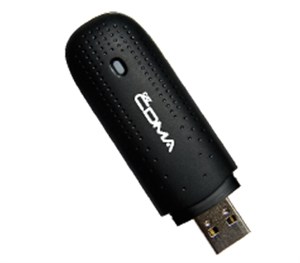
CDMA modem is a modem that uses a frequency of 800 MHz CDMA or CDMA 1x . The latest at the moment is to use the frequency EVDO Rev- A or the equivalent of 3G and the latest technology is CDMA EVDO Rev- B .

TYPES OF SCANNER

TYPES OF SCANNER
1. Scanner Drum
drum scanner
Drum scanners use technology photomultiplier tubes ( PMT ) to read the object to be scanned.
The drum scanners are typically used to scan large images , although it could be to thumbnails .
The advantages of this type of scanner is best to produce scanned images that detailed , accurate , and the most important advantages of this type of scanner is almost no vibration at all like the other type of scanner , so that the scanning process will not affect the scanned because of vibration tools. These types of scanners can produce scan resolution up to 24,000 ppi .
Disadvantages of this type of scanner is its large size and the price is very expensive , and limited types of objects that can be scanned.
2. Scanner Flatbed
tipe scanner flatbed
gambar disadur daridrumscan.com
This type of scanner uses CCD technology ( Charge Coupled Device ) or CIS ( Contact Image Sensor ) as the "eye " in reading the scanned object . This scanner is most commonly found and used , because its technology can be fairly inexpensive and are commonly used .
The advantages of this scanner is that the CCD and CIS technology requires only a very low power to operate , so it is very often used with computers by taking electricity and distribute data from a computer's USB jack . A scan type scanner is fairly good for the needs of the scanned images and photos or documents .
Disadvantages are the limited types of scanners scan only on one side of the object . Not effective if used in scan a document or image in large numbers .
The development of this type of scanner to scan lawyer- khususan needs , sepertiScanner Books , Large Size Scanner A3 .
3. Scanner Film
tipe scanner film
Although using the same technology with eye scanner flatbed scanner types , namely the CCD ( Charge Coupled Device ) but the difference is this scanner to scan and convert data from a film negative or positive flim ( slide ) well . The advantages of this scanner is able to produce scanned very well and are large because of the scanned object " source " , a film negative . Disadvantages of this scanner is a fairly expensive and only to scan any object in the form of films .
4. Scanner Roller
he different types of scanners is the most fundamental is how " interesting " documents. If the scanner flatbed type moves " eye " scanner , while the Scanner Roller type is "exciting " to pass the document over a scanner eye .
This process resulted in the withdrawal of documents quickly, so efficient in scanning documents numerous.
Scanners of this type again divided into two groups , namely the ADF (Automatic Document Feeder ) and Sheet Feed , as follows :
tipe scanner adf (automatic document feeder)a. Scanner ADF (Automatic Document Feeder)

ADF Scanner is a new type of scanner developed specifically to scan documents in large numbers. These scanners have a "place" to put the document you want to scan and then will be "pulled" automatically scanned, unlike the type Flatbed scanner that requires laying out each document you want to scan. The advantages of this type of scanner is the efficiency in scanning documents in large quantities, usually sorely needed in the modern enterprise. And even as their place to scan documents then produce proper position in each of them, so now many emerging conveniences that can be offered in this type of scanner, such as for example: Check Scanner LJK value. Disadvantages of this type of scanner is a fairly expensive and have parts that must be replaced after a scanner scanning a certain amount, namely: PaperPad and Roller her, nevertheless its spare-part prices affordable and easily replaceable.
tipe scanner sheet-feedb. Scanner Sheet Feed

Scanner type Sheet Feed Roller is similar to the way the ADF scanner , but does not have a " place " to put the paper / document, where the scanning process requires us to feed paper one by one . Scanners of this type is known as the Mobile Scanner / Scanner Notebook / Portable Scanner . The advantages of this scanner because of its small and power requirements are small , easy to carry anywhere and are usually used with a laptop / notebook . The process of sending data and electrical power can simply use the USB - port of your computer or laptop . High mobility and the dependence of the stability of our hands . Disadvantages of this scanner is the limited size of scanned documents , as well as spare-parts have to be replaced after a certain usage .
5. Scanner Tangan
tipe scanner tangan
gambar disadur dariusb.brando.com

How to scan scanners of this type is to manually move it by hand on an object / document . This scanner can be distinguished by Hand Document Scanner and Scanner 3D ( 3 -dimensional ) . The advantages of this type of scanner is a high mobility offers simplicity in the process of scanning an object on any surface . And the price is quite cheap . Disadvantages of this type of scanner is its dependence on the stability of our hands in performing the scan , too fast , sloping and uneven surface scan can produce distorted images until unreadable . Sheet Feed Scanner so that usually an option successor

TYPE PRINTER COMPUTER

TYPE PRINTER COMPUTER


1. Printer InkJet

Jenis-Jenis Printer Dan Fungsi Printer

InkJet Printer Image (Epson WP 4020) This printer type is most common at this time. These printers squirt ink onto the paper to form an image. This occurs because there is a magnetic plate which directs the ink onto the paper in accordance with the desired pattern. The print quality of inkjet printers print quality almost equal to the laserjet printer. Quality standard inkjet printer is 300 dpi (dots per inch), although the type of printer that has already started to improvise. In addition to color inks, inkjet printer can also be set to print in black and white. Ink-jet printers are already using the medium of ink that has been filled on a storage medium and is ready for spraying dots of color combinations are ordered by computer. Because the system uses a spray then the results obtained are of better quality than dot matrix. The sprayed ink can quickly dry out in a matter of seconds. Excess Inkjet Printer: - Results print faster than dot matrix - The quality of the print is good enough - Not too noisy type in print Inkjet Printer Disadvantages: - Prices are relatively more expensive than dot matrix - Relatively expensive original printer ink - Unable to print more than one double
2.Printer dot matrix
Jenis-Jenis Printer Dan Fungsi Printer


Images of Dot Matrix Printer (Epson FX-2190) Dot matrix is ​​a system formation character of a number of dot-dot dot matrix printer has the element consisting of needles are pressed ribbon so that it can print on paper. Printer category using the ribbon as the ink, and a pin that serves as a club for printing on paper field. Prints in the form of tiny dots that compose into character. Therefore, this printer printout looks rough. This printer works just like a typewriter so by using this printer, prints can be directly concurrently with carbon. This printer produces only a single color matches the color of the ribbon are paired, usually red or black. Printing speed varies widely ie between 50-500 characters per second. The pin number varies greatly between 9 -24 and specify the print quality produced. Although the current printer technology is increasingly sophisticated, but the dot matrix printers are still produced for dot matrix printers can be used to print a copy of the document, which is typically used to create Continues Form, receipt and document that has already been printed more like stopmap, envelopes, etc. Advantages of dot matrix printers - Can print copies at once. - Can print large paper sizes. - The cost of printer ribbons which are relatively inexpensive Disadvantages Printer dot matrix - The dpi and ppm low so printout looks rough - Printing process is slow - His voice is noisy when it works - The resulting color does not vary.

3. Printer LED/LCD

Jenis-Jenis Printer Dan Fungsi Printer

Image Printer LED ( Samsung CLP 415nw ) Basically the type of printer LED / LCD is similar to a laser printer but do not use the laser to create patterns on the drums but using light . People often equate with printers Laser printers LED / LCD . The print process is almost the same but the printer LED / LCD using light- emitting diodes . These printers produce high quality prints so be it text or graphics .

4. Printer Laser Jet

Printer Laser Jet

Figure LaserJet (Xerox Phaser 3250) Laserjet printer or laser printer is often referred to as a type of printer that uses a laser to the printing process. Work Process Laser Jet Printer First of all kind of laser illuminates the drum to create patterns of images to be printed. The drum then rotates through a toner (a kind of ink for laserjet but in the form of powder and liquid) and a section on the electrified drum take the toner. Then with a combination of pressure and heat. ink in the drum was transferred to paper. Laserjet printer works very fast and its cartridges last longer. Just like laserjet printer inkjet printers can also be set to print in black and white only or the entire color CMYK (Cyan, Magenta, Yellow, Black) Due to a system similar to that used photographic copy of a drum, the difference in copy machines reflection focused on a rotating cylinder, while the laser printer shadow created by a point per point by a semiconductor laser. The resulting print quality is also very keen in addition to fast and cost-effective ink. A laser printer is highly appropriate for those frequencies printed in large quantities. Suitable for businesses as well as Copy and Printing Office. Advantages of Laser Jet Printer: - High print speed - Excellent print results - Low noise Disadvantages of Laser Jet Printer: - The price of expensive printer - Fast Heat

5. Plotter / Wide Format Printing

Plotter / Wide Format Printing

Image Printer Plotter ( Designjet Z6200 ) Plotter is one of the output devices can print graphics on the paper surface , Vinyl , Sticker , and various other ingredients in large measure with satisfactory results . Printer plotters suitable for those who receive digital print services such as outdoor and indoor banners, posters , stickers , cutting , etc . This type of printer is reliable printing accuracy . There are two types of the flatbed plotter plotter printer and plotter drum . Excess Plotter : - Can print large paper - The print speed is very good - The print quality was excellent - Low noise Disadvantages Plotter : - Prices are relatively expensive - Takes place - Boros ink

TYPES OF COMPUTER MOUSE


TYPES OF COMPUTER 
MOUSE


Physically mouse has two types that we use , the difference in the two types of mouse can be seen from its physical form different from each other .
1.Mouse Optic

Well , the name you might have guessed , right? Mouse type optical uses optical technology to move the pointer that put it at the bottom of the mouse .
2.Track Ball

Type trackball mouse can be easily identified by looking at the small ball that is used to move the pointer .   Next mouse there are some types that can be distinguished by the port.1.Mouse Serial
Serial mouse is widely used in the computer era antiquity , namely the era of Pentium 3 or Pentium 1 manifold AT . From its shape , this mouse shaped serial port that has several pins on the tip of the port.
2.Mouse PS2

Mouse PS2 to date is still being used despite its fairly staying slightly since been many types and mouse with newer technologies .   In terms of form , PS2 Mouse has a characteristic green color at the end of the cord , the color is used to distinguish between a mouse and a keyboard that typically use blue or purple .
3. Mouse USB
Until now the type of USB Mouse is still the most common and most widely used by computer users , because it is highly compatible USB Mouse for computers today .
 
Judging from its shape , USB Mouse shaped mempunyaui characteristic port at the end of the cord. Its use is very easy, you just plug or plug into your computer's USB port , and the mouse is ready to use.
4. Mouse Wireless
The latest technology of the mouse is in her mouse with wireless features . With the use of their wireless cable was successfully removed , and mouse can be used from a distance
are quite far apart the computer .

TYPES OF COMPUTER KEYBOARD


TYPES OF COMPUTER KEYBOARD


  1. KEYBOARD SERIAL. 
    Using DIN 5 male and usually used in AT -type computer . Picture below is the port that is used on a computer keyboard type serial and serial images of the Keyboard . 
  2. KEYBOARD PS/2. 
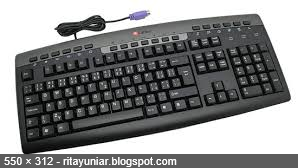
    Usually used in computer ATX , and is currently the most widely used . Installation of the keyboard of this type must be done carefully , because the port is owned equally by the port for the mouse . the picture below is a port and keyboard type PS / 2 .
  3. KEYBOARD WIRELESS. 
    As the name implies , this type is not using the keyboard as a liaison between the keyboard cable to the computer . Type of connection used is infra red , wifi or Bluetooth . To connect the keyboard to the computer , it takes the transmitter unit and receiver . The transmitter unit is usually found on the keyboard itself , while the receivers are usually attached to a USB or serial port on the CPU . Picture below is a picture along with the type of wireless keyboard optical mouse .
  4. KEYBOARD USB.Latest computers are now widely used type of USB connector is the latest generation of keyboard types . The shape is very flexible and tend to carry any bias . Keyboard This type of bias is classed as a portable keyboard . Generally made of rubber , and certainly watertight . Picture of a USB keyboard can be seen below .

The structure of a key on the keyboard
From the side buttons are used , the keyboard has a development that is not too rapidly since it was first discovered . What's happening is some key additions that help further accelerate the opening of the application program .
In general , the structure of a key on the keyboard is divided into four , namely :
a. Button type ( typing keys) is one part of the keyboard that contains letters and numbers , as well as read tana . In general , there are two types of arrangement of the letters on the keyboard , the type QWERTY and Dvorak . However , the most widely used to date is the QWERTY layout .


b . numeric Keypad This section is a special section of the keyboard which contains numbers and functions to enter data such as number arithmetic operations . Srtuktur numbers arranged to resemble a calculator and other calculators .

c . Function Buttons ( Funtion Keys ) In 1986 , IBM added several function keys on a standard keyboard . This button can be used as a special command that is included in the operating system and applications.

d . Control key ( Control Keys ) This button provides control of the cursor and screen . The keys are included dala this category are four arrow buttons between the symbolic and numeric keypad type buttons , home , end , insert, delete , page up , page down , control ( CTRL ) , alternate ( ALT ) , and escape ( ESC )

The following image is the keyboard along with the role of the role of the buttons in full:

TYPES OF COMPUTER MONITOR

TYPES OF COMPUTER MONITOR


1. Monitor CRT
Monitor CRT

CRT (Cathode Ray Tube) is a kind of old monitors are popular and commonly found on older computers, for now the use of CRT monitor type is not used much anymore considering has been the emergence of new technologies such as LCD monitors and plasma quality and ability is much better.   CRT works by emitting cathode rays (electrons) high speed inside the vacuum tube. Next emission from the cathode ray will memanulkan screen that is flouroscent (when wearing fluorescent light).   The reflection of electrons or the cathode to form a pattern on the screen, and while the cathode ray will continue to reflect the screen according to the input that has previously been in the conversion into an electromagnetic wave.   Adapaun advantages of using a CRT monitor types is the price that is cheaper and economical when compared to other types, while some of the disadvantages of using a CRT type monitor is power consumption is high at about 300-400 watts so it is often less convenient for the user's eyes, especially if used in a long time.   To cope with the radiation of a CRT monitor is usually the kind of glass can add additional filters to reduce light radiasai pancarkaan elektormagnetik that in the monitor, so it will also make the user's eyes more comfortable when interacting with CRT type monitor.   The physical size which tend to be large and heavy also become one of the shortcomings of the CRT monitor, it will be take place when the user is wearing it.
2. Monitor Liquid Crystal Display (LCD)
Monitor LCD

Next monitor type of LCD (Liquid Crystal Display) monitor that is collated using a liquid crystal display that can deliver quality color dihasilakannya which is much better than the CRT type monitor.   LCD monitor technology types have more light, or we are familiar with pixels consisting of a single liquid crystal as a point of light. Although referred to as a point of light, this liquid crystal does not emit light. The light source in an LCD device is a white fluorescent lights at the rear of the liquid crystal composition earlier.   Points of light or pixel numbering tens of thousands or even millions will be formed in the image display. Polar liquid crystals through which electric current will change due to the influence of magnetic field polarization arising and therefore will only let a few colors forwarded while other colors are filtered.   Some of the advantages of LCD monitor type is the picture quality looks more clear and sharp and more comfortable to the user's eye keetika use it, not only that the LCD is also more power efficient, more tips are physically and easier in terms of display settings.   While some deficiencies LCD monitor type is more sensitive cendeurung screen and limited viewing angle and color depth is limited and certainly more expensive than the type of CTR.
3. Monitor LED (Light Emiting Diode)
Monitor LED

The monitor type LED (Light Emitting Diode) technology with nearly the same as the LCD. LED is a further development of LCD display which has the effect of an increase in color display that has a quality and more color variation.   Some types of LED monitors have a function and the more advanced features in the appeal as their type of LCD monitor touch screen technology, the internet and digital TV Digital TV tuner. LED monitors are also considered to be able to save the power consumption up to 40% -70% if compared to the LCD with the ability to produce extremely sharp images.   Some of the advantages of LED monitors is such a contrast, sharp images up to millions of pixels, power usage is much more efficient than the LCD, a longer service life, more slim and better lighting in the appeal monitor LCD type.   In terms of types of LED monitors shortage of course the price is still relatively more expensive that many users who still prefer CRT type monitor or LCD, LED monitor shortfall next is likely to be more sensitive.
4. Monitor Plasma
Monitor Plasma

Type plasma monitor is a combination between CRT and LCD technology. The presence of plasma monitor is able to make the screen becomes thinner resemble LCD and CRT-wide viewing angle.   Some of the advantages of plasma monitor type is found in the quality of which resembles a CRT display with a high contrast is 10000: 1. Besides plasma also has a superb color as well as shape look slimmer.   In terms of shortages of course plasma have a price relatively expensive, so often users still prefer to use the old type monitor it more affordable, than that of plasma also has a large pixel pitch size and power consumption and high temperature operasioanl.   How it works plasma monitor is a flat-screen emisif where the light is generated by phosphorus detected a plasma discharge between two flat screens. The released gases do not release mercury. Type plasma monitor using a full color flat panel phosphor to display images and color reproduction so the combination that produced very good's qualitative and interactive.
5. Monitor OLED
Monitor OLED
J
enis Monitor OLED (Organic Light-Emitting Diode) is a semiconductor as a light-emitting layer made of organic. OLED itself is used in technologies such elektroluminesasi on screen display and sensor applications, is famous for its technological sophistication over felxibel with attenuation of less than 1 mm.   OLED created from structures consisting of layers of glass made of tin oxide-indium as the positive electrode, or anode, an organic layer of diamine aromatic having a thickness of 750 nm, a layer of light-emitting made of compound metal complexes such as 8-hydroxyquinoline aluminum and electrode layer negative or cathode is made from magnesium alloy and silver by atomic ratio of 10: 1. Overall construction layer is not more than 500 nm, which means that the same OLED thin sheet of paper.   The use of OLED is actually not overly used by computer users considering the price is relatively expensive. OLED monitors are widely used in mobile phone technology such as the latest smartphone that the screen uses OLED technology where pixels are supported approximately 16 million colors that make images or the results of the resulting photo looks very clear, sharp as if it looks like the original image.
 

Blogger news

Blogroll

About